



How to Make a Dieline for a Box (and Download a Free Template)
Updated · Vorex Packaging
To make a dieline for a box, measure the inside length, width and height your product needs, choose the box style and the board (SBS paperboard for cartons, E-flute corrugated for mailers), and generate the flat template with cut lines, fold lines, a 0.125 in bleed and a safe zone. Download it as SVG or PDF at actual size, print a test at 100% and fold it, then place your artwork on it in Illustrator, Affinity, Inkscape or Canva and ask your printer to confirm the final die line. The free Vorex dieline generator does the geometry for eight common styles.
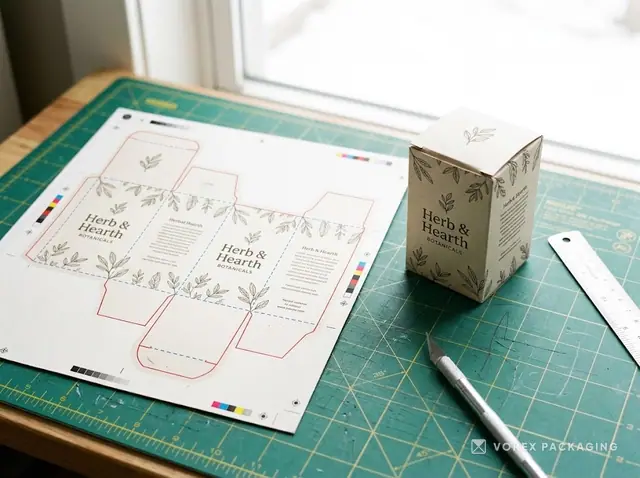
What is a dieline, in one minute
A dieline is the flat, unfolded drawing of a box. It shows where the sheet will be cut, where it will be folded and where glue goes. Everything you print sits on top of this drawing, so if the dieline is wrong, the box is wrong: a logo lands across a fold, a tagline gets trimmed off, or the lid will not close. Making a dieline is less about drawing skill and more about getting four things right: the inside size of the product, the box style, the board thickness and the allowances for bleed and safe zones.
This guide walks through the steps, and the free dieline generator does the geometry for you for eight common styles. If you only want the template, jump to the download step.
Step 1: measure the product, not the box
Start with the inside size the box must hold: the length, width and height of the product, plus any insert or wrap. Add a small amount of play so the item slides in without being forced. For small cartons a few millimetres is enough. For a mailer that holds several items, pack them on a table the way they will ship and measure the stack.
Write the size as L × W × H in the order the tool asks for. Mixing up width and height is the single most common reason a first sample does not fit.
Step 2: pick the box style
Each style has its own flat shape, so a template for one style never works for another. The generator covers the eight styles small brands order most, each with its own page and ready-made sizes:
- Reverse tuck end and straight tuck end cartons for cosmetics, supplements and small retail items.
- Auto-lock bottom cartons for heavier products such as candles and jars.
- Mailer box (the classic e-commerce box) in E-flute corrugated.
- Pillow box and sleeve for gifts, soaps and small sets.
- Two-piece box (base and lid) and gable box for gifts and favours.
Not sure which one you need? The box styles guide compares them by product type and the mailer box page explains the most popular one in detail.
Step 3: choose the board
Board thickness changes the dieline. Every fold needs an allowance equal to roughly the thickness of the board, and a lid panel has to be slightly larger than the base it closes over. The generator offers SBS paperboard (the smooth white board used for folding cartons), E-flute corrugated (the thin fluted board used for mailers) or a custom thickness you type in. If you are unsure, use SBS for cartons and E-flute for mailers; your printer will confirm the exact caliper before production. The corrugated guide explains flutes and the materials page covers the rest.
Step 4: understand the lines on the template
A dieline uses a few line types, and keeping them apart matters when you place artwork:
- Cut lines (solid) mark the outside edge of the flat blank and any windows.
- Fold lines (dashed) mark creases. Never put small text or a logo across one.
- Bleed is the area outside the cut line that your background colour must extend into, so a tiny shift on the cutting table does not leave a white sliver. The generator draws a 0.125 in (3.2 mm) bleed.
- Safe zone is the area inside each panel where text and logos should stay. The generator uses a 0.125 in safe zone inside each main panel.
- Glue flap is the panel that gets glued when the box is formed; keep it free of important artwork.
The templates also carry panel labels, a legend with every panel size, the flat sheet size and the board, plus 1 in and 25 mm scale bars. The glossary has short entries on dieline, bleed and die-cut if you meet a term you do not know.
Step 5: generate and download the template
Open the dieline generator, pick the style, enter the inside length, width and height in inches or millimetres, choose the board, and adjust the glue and tuck flaps if you need to. Download the dieline as SVG or PDF. Both are drawn at actual size, so you can place them straight into your design file. Each style page also lists pre-made templates for common sizes if you would rather not type anything.
Step 6: print a test and fold it
Before you spend time on artwork, print the PDF at 100% (actual size, not "fit to page") on plain paper or thin card. Measure the 1 in bar in the legend with a ruler; if it is not exactly one inch, your print dialog scaled it. Cut along the solid lines, score and fold along the dashed ones, and put your product inside. This ten-minute check catches a wrong dimension long before a printer does.
Step 7: place your artwork
Open the SVG or PDF in Illustrator, Affinity Designer, Inkscape or Canva. Keep the dieline on its own layer, locked and set to not print. Extend background colours and photos out to the bleed line. Keep text, logos and anything that must not be trimmed inside the safe zone. Remember that panels fold in different directions: the generator's panel labels tell you which face is the front, back, top and sides, so artwork reads the right way up once the box is formed. Export a PDF with the dieline layer visible for your printer and a second one without it if they ask.
Step 8: send it to print
Every printer runs its own board and cutting dies, so ask them to confirm the final die line for their material before you finalise artwork. They may adjust a flap or an allowance by a millimetre. Then send the artwork and ask for a digital proof on the dieline, and if it is a new box, a physical sample. At Vorex, you approve a proof of your design on the dieline before anything goes to press; if you would like a specialist to check your template or size the box for you, start a project and attach the file.
Common dieline mistakes
- Measuring the outside of an old box instead of the product, so the new box is too tight.
- Using a template for a different style or board thickness.
- Forgetting the bleed, which shows as white edges after cutting.
- Placing a logo across a fold or a tuck flap.
- Printing the test at "fit to page", which quietly shrinks the template.
- Rasterising the dieline into the artwork so the printer cannot separate the cut layer.