














How to Prepare Your Logo File for Box Printing
Updated · Vorex Packaging
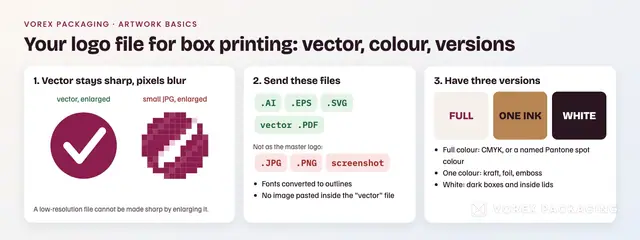
Send your logo as a vector file (AI, EPS, SVG or a PDF from a vector program) with fonts converted to outlines, colours set as CMYK values or a named Pantone spot colour, and three versions ready: full colour, one colour and white. A JPG or PNG is made of pixels and blurs when enlarged on a box.
The short answer
Send your logo as a vector file: an AI, EPS, SVG or a PDF exported from a vector program, with the fonts converted to outlines. Give the colours as CMYK values or a named Pantone spot colour, and have three versions ready: full colour, one colour and white. A JPG or PNG is made of pixels and goes soft when it is enlarged across a box lid. This post is only about the logo file; placing the whole design on a dieline, bleed and safe zones are covered in our guide to preparing artwork for custom boxes.
Why does a box printer ask for a vector logo?
A vector file stores the logo as shapes, not pixels. Wikipedia's article on vector graphics explains: "Vector art is ideal for printing since the art is made from a series of mathematical curves; it will print very crisply even when resized." It contrasts this with "a low-resolution raster graphic", which "would blur or pixelate excessively" when enlarged the same way. On a box the same logo may be 1 inch wide on a side panel and 8 inches wide on a lid, so the file has to work at every size.
Vector files also let the printer pull out one colour for a foil plate, an emboss or a one-colour kraft print, which a flat photo of your logo does not allow.
Which file formats should you send?
| Format | Vector? | Notes |
|---|---|---|
| .AI (Adobe Illustrator) | Yes | The usual master file from a designer. |
| .EPS | Usually | An older exchange format; fine if it was saved from a vector program. |
| .SVG | Usually | Open web standard. The W3C specification says "SVG allows for three types of graphic objects: vector graphic shapes (e.g., paths consisting of straight lines and curves), images and text", so an SVG can also hide a pixel image inside. |
| Depends | Vector if exported from Illustrator, Affinity, Inkscape or similar; not if a JPG was saved as PDF. | |
| .PNG, .JPG | No | Pixel images. Useful for reference, not as the master logo. |
| Screenshot, social avatar | No | Too small and often compressed. |
How can you tell if your logo file is really vector?
- Zoom in a long way. Open the file and zoom to several hundred percent. Vector edges stay smooth; pixel edges turn into steps and blur.
- Look at the outline view. In a vector program, an outline or wireframe view shows paths around each letter and shape. A single rectangle around the whole logo means it is one embedded image.
- Try to select one letter. In a true vector file you can click a single letter or shape and change its colour.
- Check the fonts. If a missing-font warning appears, the text is still live type. Ask for a version with the text converted to outlines (paths) so the printer does not need your fonts.
What if you only have a JPG or PNG?
- Ask whoever designed the logo for the source files. Designers usually keep an AI, EPS or vector PDF.
- Have the logo redrawn as vector if no source exists. Automatic tracing can work for simple shapes but often rounds corners and thickens thin lines, so check the result against the original.
- Send the best file you have anyway. We check every file before the proof and tell you if a logo will not print sharply at the size planned. Every order includes free digital design and dieline, and nothing prints until you approve the digital proof (see our artwork and proof policy).
- No logo yet? A simple text logo is a fine start for packaging. Our logo maker helps you try a few options.
How should the logo's colours be set?
Screens mix light (RGB); presses lay down ink. Two ways to specify ink colour:
- CMYK (process colour): the colour is built from cyan, magenta, yellow and black dots. Give your brand colour as four CMYK values.
- Spot colour: one premixed ink, usually named by a Pantone number. Wikipedia defines a spot colour as "any color generated by an ink (pure or mixed) that is printed using a single run, whereas a process color is produced by printing a series of dots of different colors."
If your brand colour must match across boxes, bags and labels, name the Pantone colour in the file and in your request. Also remember the board: colours print darker and warmer on brown kraft than on white board (compare kraft vs white boxes). Metallic logos are usually foil stamped rather than printed; see spot UV vs foil stamping.
Which versions of the logo do you need?
- Full colour for printed lids, sleeves and labels on white board.
- One colour (solid black or one brand colour) for kraft boxes, foil, embossing and one-colour stamps. Gradients and shadows do not translate to foil or emboss.
- White (reversed) for dark boxes and printed insides of lids.
- Two layouts if you have them: a stacked logo for square lids and a horizontal one for narrow side panels, sleeves and tape.
Will small details print?
Think about the smallest place the logo will appear, such as a 2 x 2 in earring box lid or the side of a sleeve. Very thin lines, tiny taglines and fine outlines may fill in or break at that size, especially in foil or emboss. Keep a simplified version without the tagline for small uses. The digital proof shows the logo at its real size on the box, so check it there, at 100%, before approving.
How should you send the files?
- One folder or ZIP with each version clearly named, for example brand-logo-fullcolour.ai, brand-logo-1colour.pdf, brand-logo-white.svg.
- A short note with your Pantone or CMYK values.
- A PNG reference of how the logo should look, in case a file opens differently.
- For the full box design on the dieline, follow the artwork guide or generate a template with the dieline generator.
Logo file checklist
- Vector master (AI, EPS, SVG or vector PDF), no embedded pixel image.
- Fonts converted to outlines.
- Colours as CMYK values or a named Pantone spot colour.
- Full colour, one colour and white versions.
- Simplified small version for tiny panels.
- Checked at real size on the digital proof.
Ready? Send the files with your box size and get a quote. There is no minimum order quantity.
The same files print on white mailer boxes and on foil or spot-UV luxury rigid boxes; the product pages list the sizes and the board.
Sources
- Wikipedia, "Vector graphics" (Printing section) and "Spot color", read 3 Nov 2026.
- W3C, Scalable Vector Graphics (SVG) 2, Introduction, read 3 Nov 2026.